
How to Create Glass Effect Text in Photoshop

In this tutorial we will create a glass effect on editable text using only blending modes. We will also work with gray tones, so the text will grab its colors from the background and adjustment layers.
Difficulty: Intermediate – Advanced
Completion time: 2 hours
Tools: Photoshop CS3
Resources: Minion Pro font – generic, any font will do.
What you will be creating
STEP 1
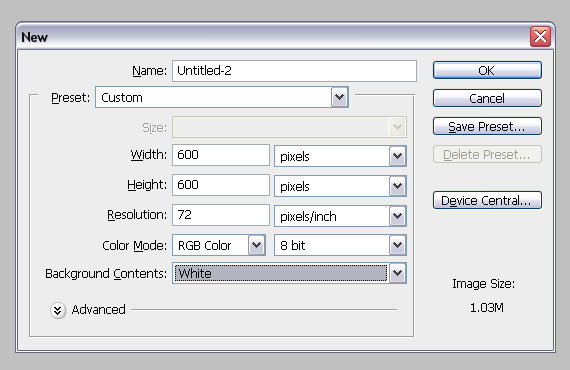
Create a new document of 600×600 px in RGB color mode at 72 dpi (File > New…).
STEP 2
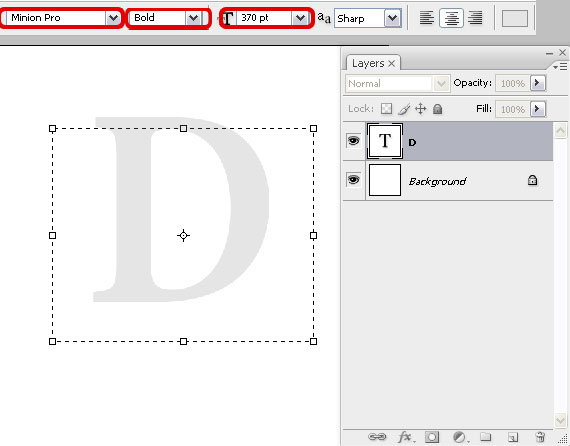
Grab the Type Tool (T), draw a rectangle large enough to fit a letter. Then type a letter of your choice. If you want a longer text, just create a larger document in STEP 1 (e.g. 1608×1050 px).
Set it to Minion Pro, 370 px and Sharp. For color, set it to #e5e5e5 – a light gray tone.
STEP 3
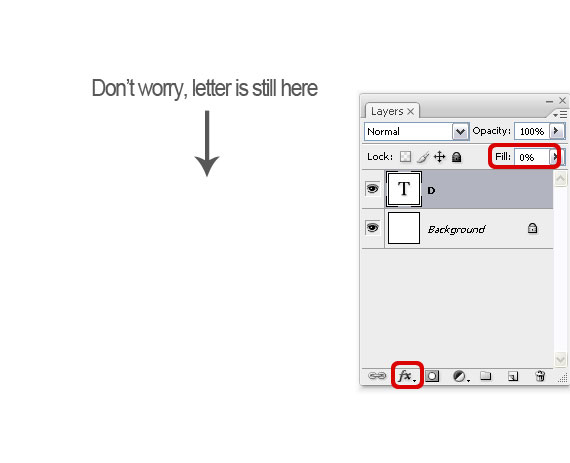
Open the Layers palette (F7) and set Fill to 0%. Select the Type layer (the thumb with a “T†in the center) and click the “fx†button. Select Blending Options.
STEP 4
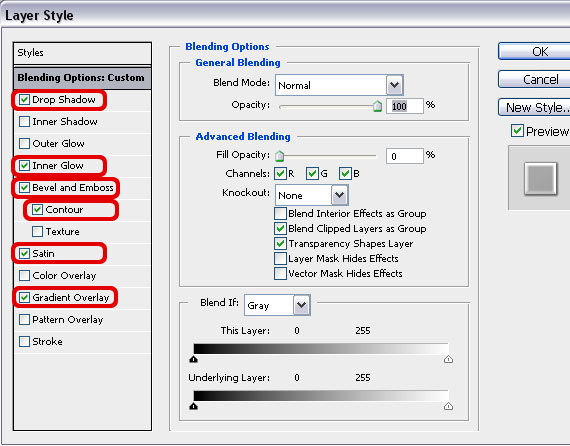
In this window, check the boxes shown below. It will look nasty at the moment, but don’t worry. We’ll fix it.
STEP 5
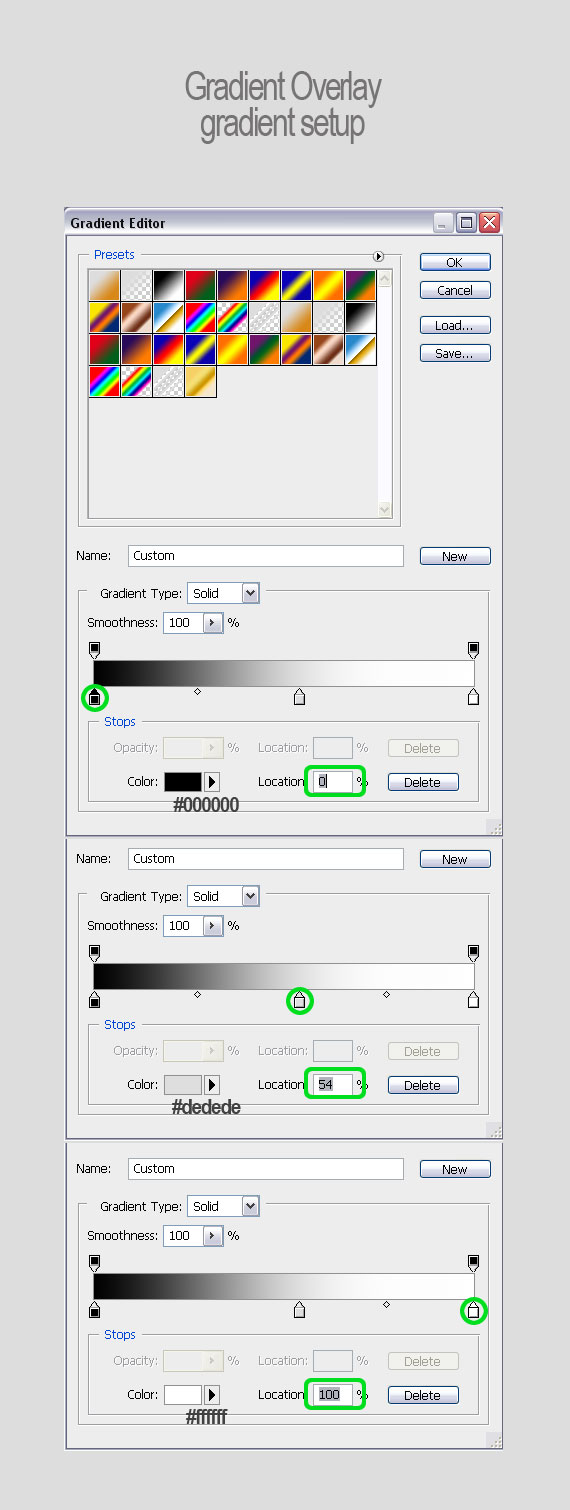
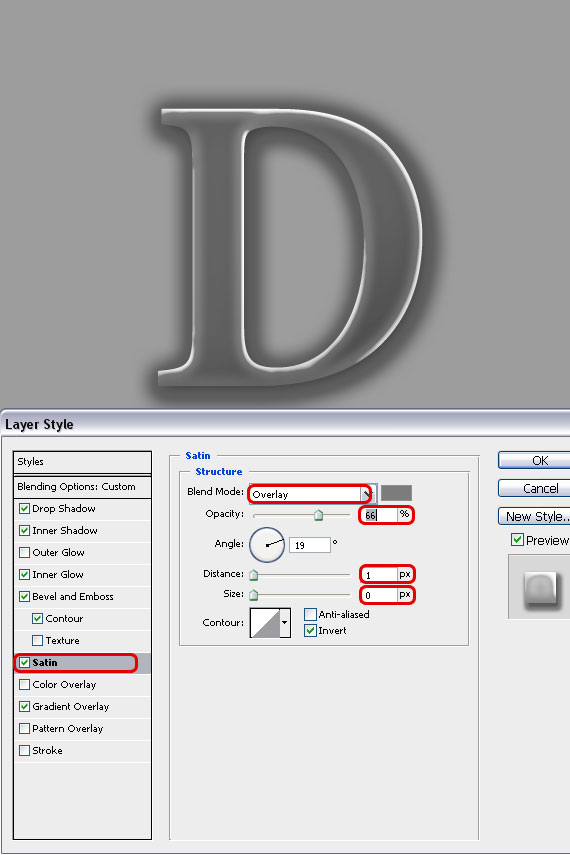
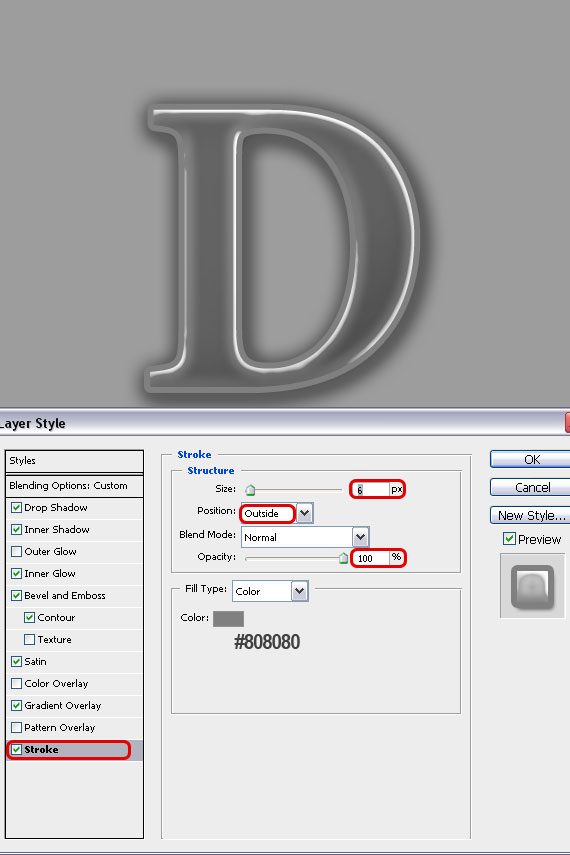
Click on each line and use the settings below. To see better what your results look like, select the “Background†layer, grab the Paint Bucket Tool (G) and fill it with a dark gray.
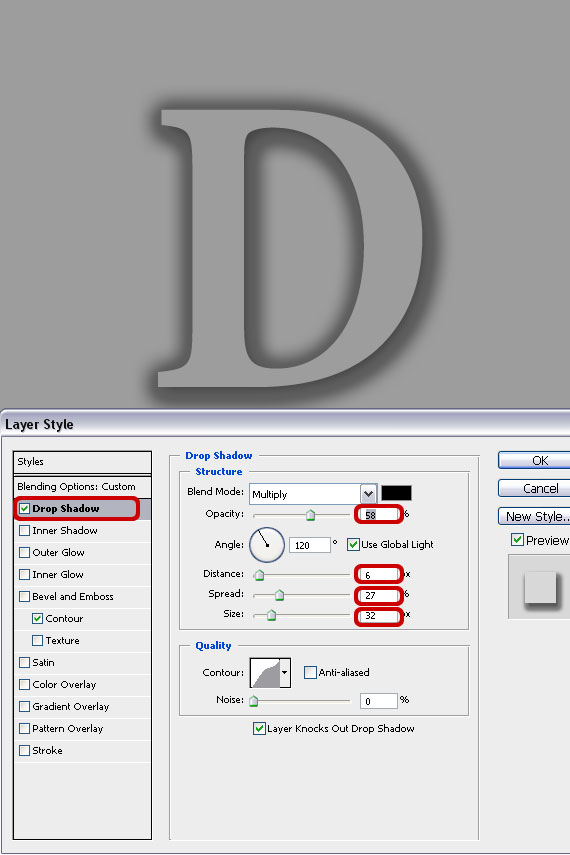
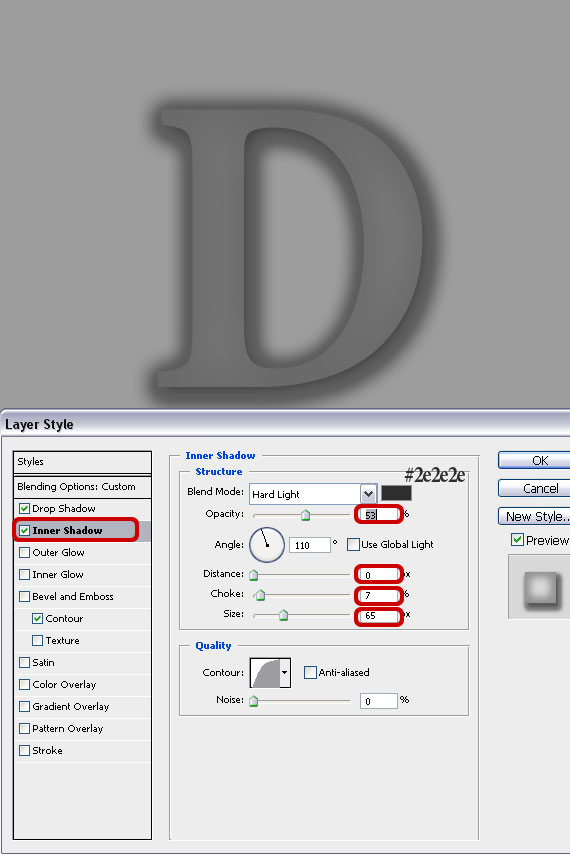
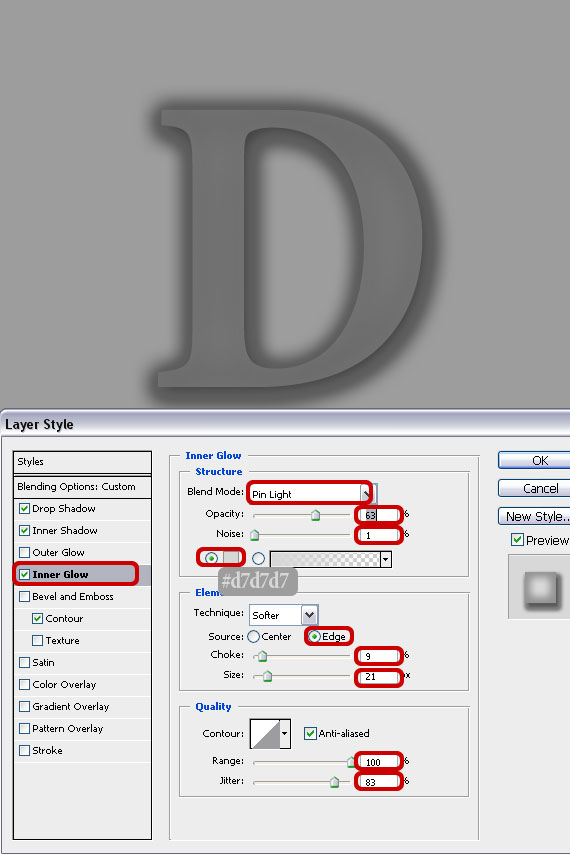
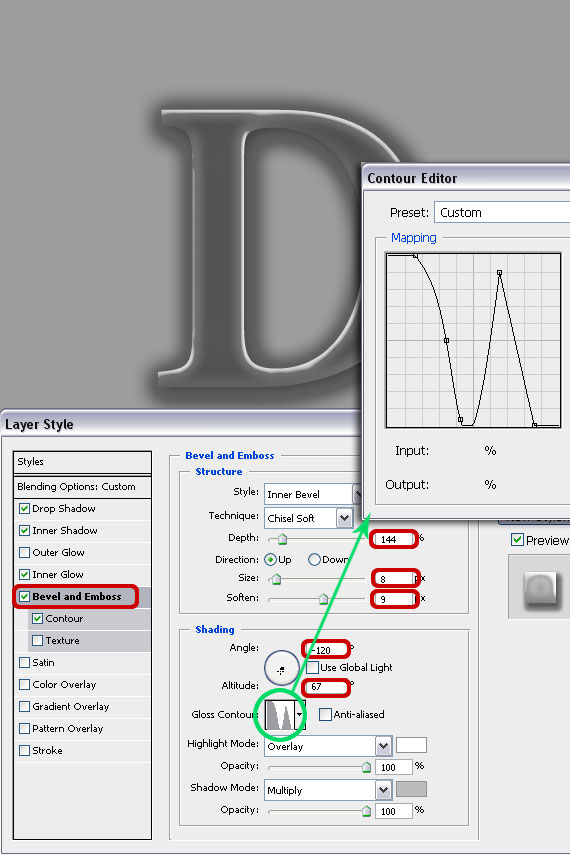
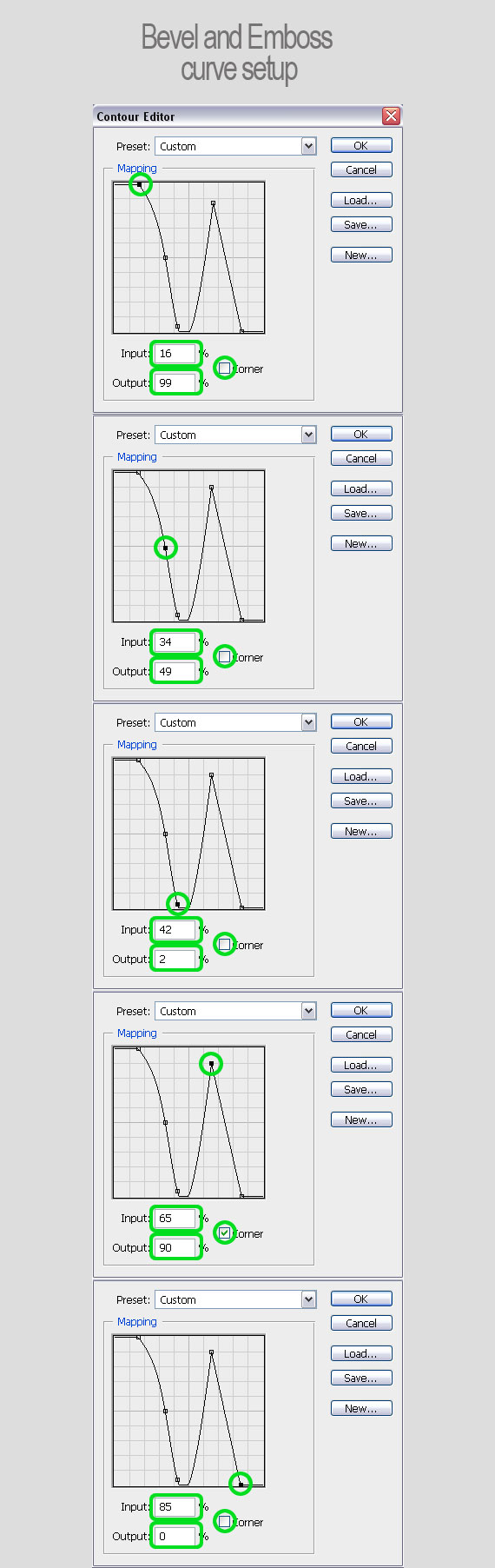
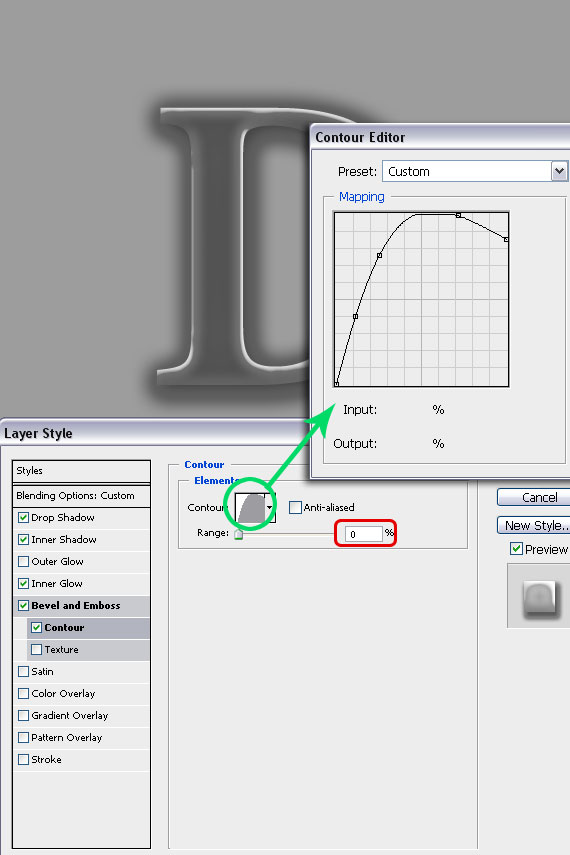
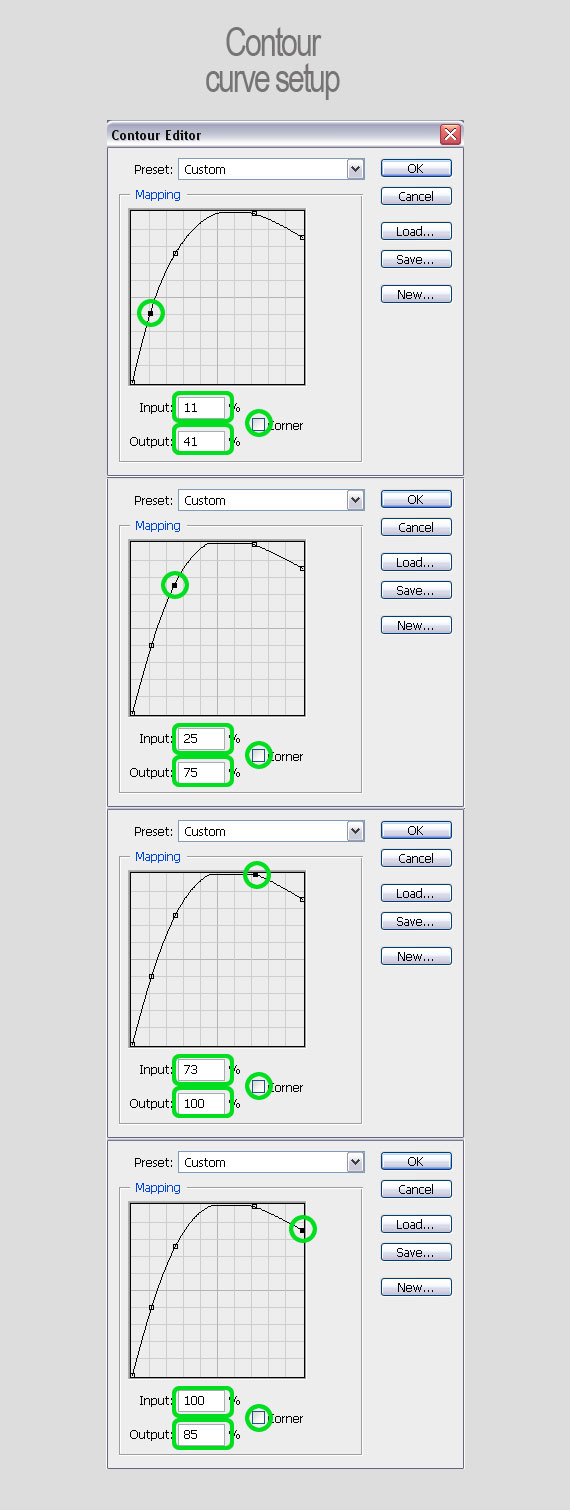
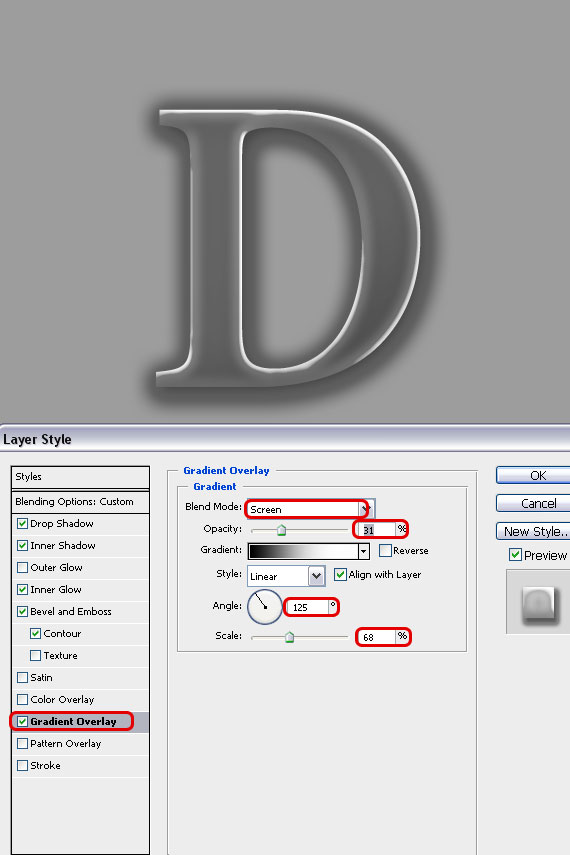
STEP 6
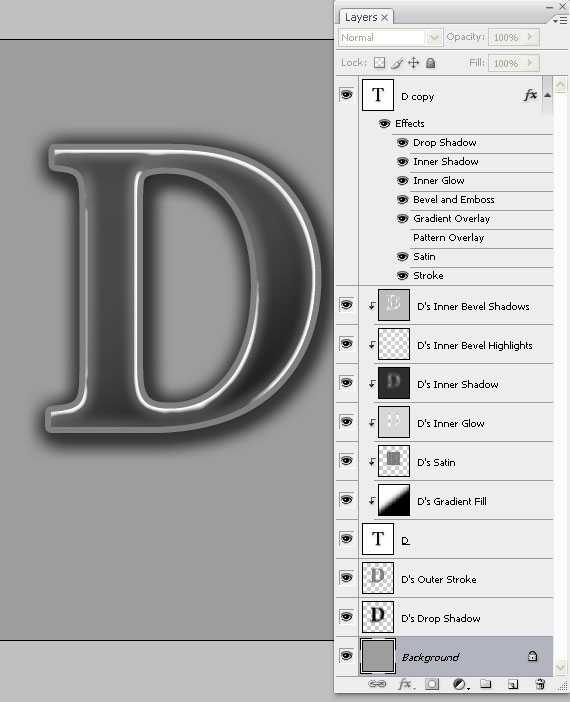
Go to Layer > Duplicate Layer (CTRL+J). Select the original layer and right-click on the effects list in the Layers palette. Select “Create layersâ€. Hit OK on the popup window.
STEP 7
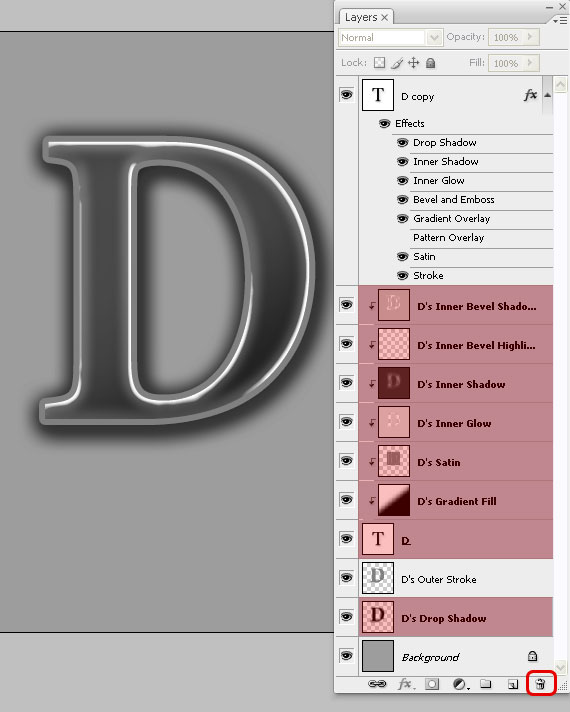
In the Layers palette, select all the layers resulting from STEP 6 (SHIFT+click), except “D’s Outer Strokeâ€, then click on the “Delete Layer†button – the one looking like a trash can.
STEP 8
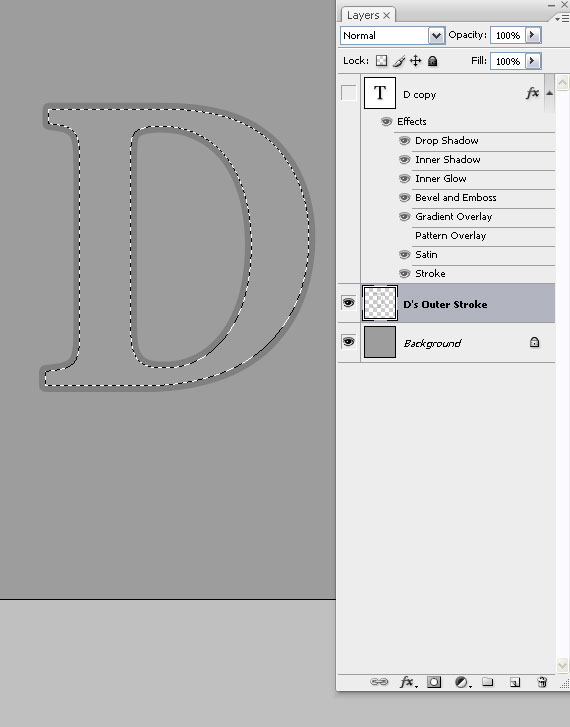
In the Layers palette, CTRL+click the “D copy†layer to load a selection (it will appear like a marching ants contour), select the “D’s Outer Stroke†layer and hit Delete.
STEP 9
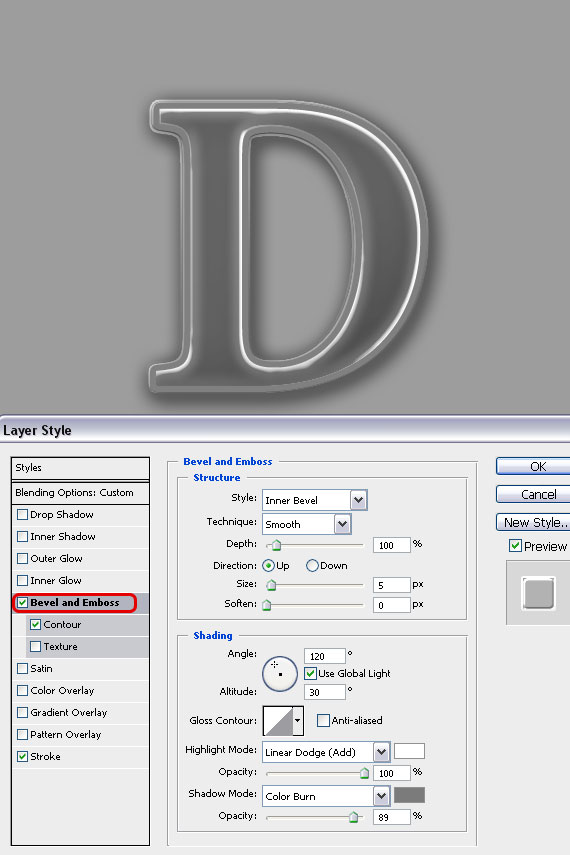
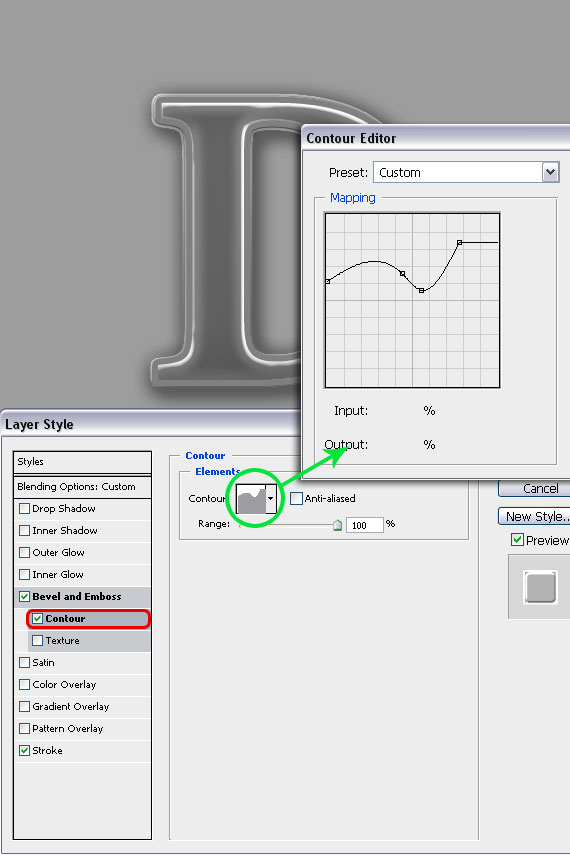
Go to Layers palette, set Fill to 0% and open the Blending Options like in STEP 3. Use the settings below.
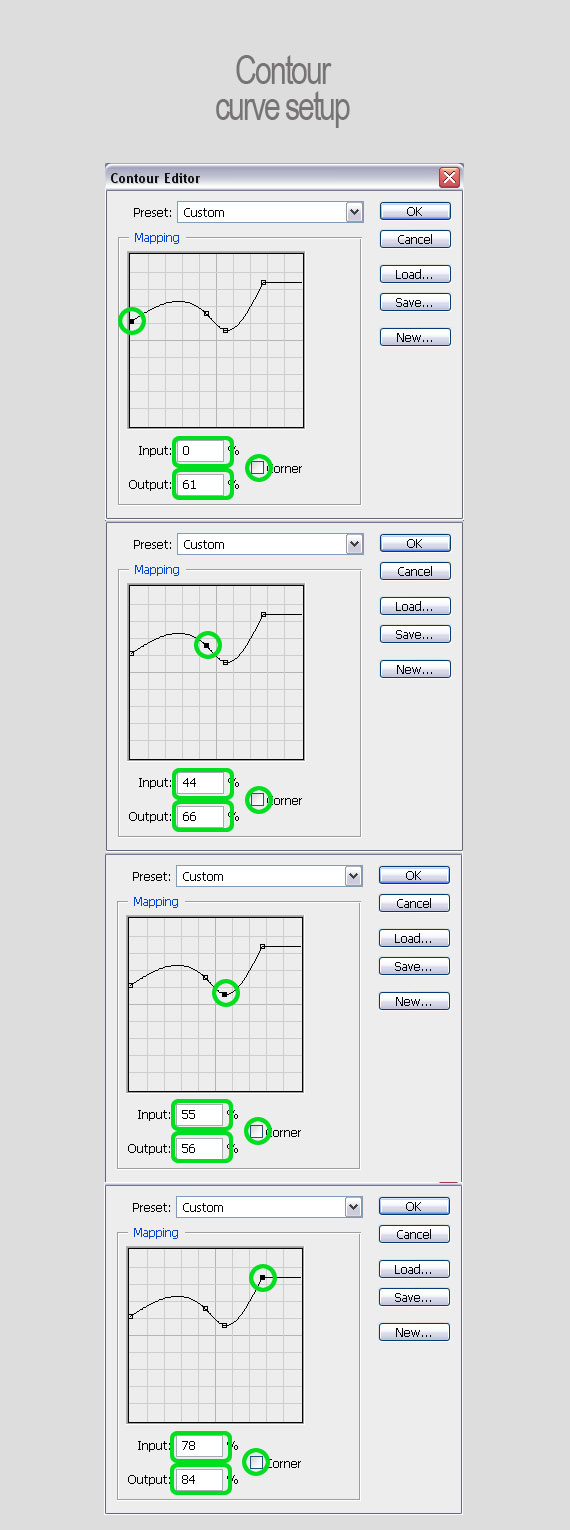
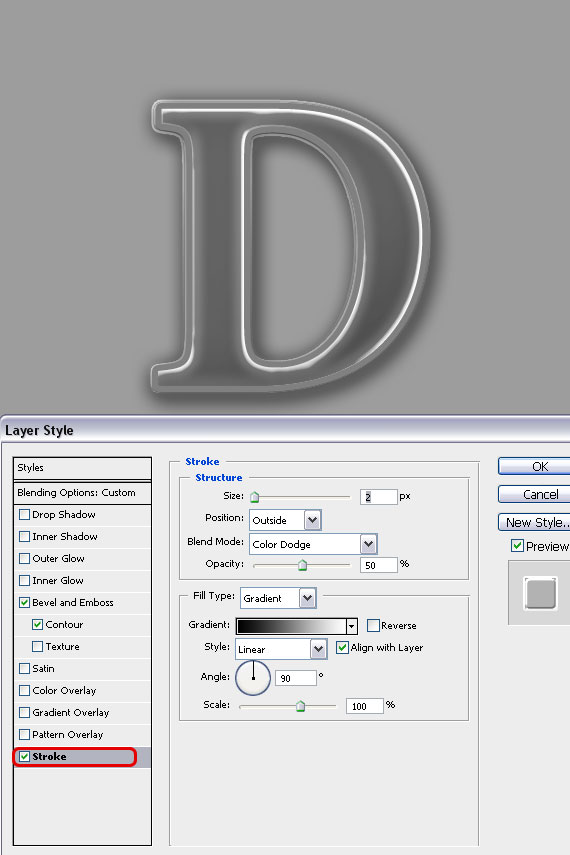
Done!
How to use it:
Simply place it over an image and if you like, add some adjustment layers to give it a nice tint.
Here are a few examples.


You can download the source file from the link below.
[download id=”158″]
Nice tutorial, thanks for the post :-)
Very interesting article, thanks. Keep up the good work.
It has been really helpful… lot of interesting hints… and real accurate analysis, hope to read more soon.
Thanks very nice tutorial thanks for brief now i got the idea for how to create Glass effect text in Adobe photoshop.
Thats really a cool piece of typographical work indeed…thanks for sharing man..
Genial post and this enter helped me alot in my college assignement. Gratefulness you on your information.
interesting stuff friend… keep up :-)
nice tutorial, very usefull!
very nice and helpful tutorial.
This is blog post is really helpful to lean this glass effect in Adobe Photoshop.
Great tutorial… really excellent work and quiet easy
I liking A New style guys
Nice, but where is the source download?
It says: “You can download the source file from the link below.”
But there is nothing below it??? :S
I want to download the tutorial but haw can.
How do i download. Please. :)
Awesome tutorial but for lazy people like me, I would rather use the ready made source.
But the download link is missing, mind fixing it?
cheers
We’re currently working on that, it’s getting fixed as we speak
This is a great tutorial! Everything turned out beautifully.
Incredible job you did down here. To lazy too and I can’t find the download link :D. Could you point me in the right direction please? Thanks in advance.
The file is available for download if you register or login with your account.
merciiiiiiiiiiiiiiiiii
very much
wtf 2 hours.??
wow .. This tutorial is amazing. By following this tutorial, I can make a company logo easily. However, I can not download the source file. How do I download the file?
We wish to get the following characters generated in graphics. Requirements:
– Characters should be in 3D
– They should appear like glass characters
C – Blue color
C++ – Red Color
C# – Yellow color
Java – Green Color
A sample of what we want can be sent as an attachment. We are willing to pay for this effort.
master!!! =P
good one
many thanxxxxxxx for the lovely tutorial..
good
thank u for sharing this info…
furniture
thank u for sharing this info…
furniture
Thanks man, this helped out a lot. I used your tutorial to create a glass pane and it turned out with the same effect. Though when I put it over a portion of the brick wall I'm using I needed to make it an overlay, adjust opacity, and change the inner glow on the object to get it to look natural.
Cheap Christian Louboutin Outlet
Sunglasses are actually all-around for any prolonged time. They’ve generally been deemed as goods of fashion and design. Many individuals have often related sunglasses with seems of sleekness without any functional function. Celebrities happen to be regarded to utilize sunglasses to help hide their faces from your stares of their fans. In spite of the ignorance of the majority of people as to the useful importance of sunglasses, their reputation has grown steadily. It really is uncommon to discover an individual with no pair of sunglasses especially through the summer season. People without the need of their sunglasses on likely have them stashed away someplace in their closets. Contrary to prevalent perception even so, sunglasses have various overall health rewards some of which might be seen below.
This design is very different from the last collabs these two have produced in terms of silhouette and color schemes. Each Dunk contains a two-toned color scheme; one pair owns a scheme of pink and yellow, while the other two use white/navy and white/varsity red. jordan 13 http://www.google.tk/webmasters/tools/richsnippets?url=run2013.org/ceshi11.html